Works with the apps you already run 1,100+ apps →

  • Shopify
  • QuickBooks
  • Salesforce
  • HubSpot
  • Slack
  • Gmail
  • Mailchimp
  • Snowflake
  • NetSuite
  • Stripe
  • Google Sheets
  • Xero
  • Zendesk
  • Dropbox
  • Asana
  • DocuSign
  • Airtable
  • Workday
  • ServiceNow

AnnE works for you

Give AnnE the job. She completes it.

Paste a job post, or describe the job in plain words, in chat or in the console. AnnE builds it with your apps, tries it on sample data, and keeps doing it once you say yes. Already automating? Bring the jobs you run today.

  • Plain words, typed or spoken
  • Tried on sample data first
  • Nothing runs without your yes
  • Every run on record
Slack · Teams · Google Chat · WhatsApp
Olivia Hart

Every Monday at 8am, send me last week's unpaid Shopify orders as an Excel file

AnnE

Got it: unpaid Shopify orders from the last 7 days, in an Excel file, sent to you here every Monday at 8:00. Shopify is already connected for you. Build it?

Olivia Hart

yes

AnnE

Built and tried on sample orders: 6 rows, 2 over 30 days. Say yes to turn it on.

Overview

Fetch all new Shopify orders, verify the payment status in Stripe, look up or create the corresponding account and contact in Salesforce to log an closed-won opportunity, conditionally add the customer to a Mailchimp re-engagement campaign if they spent under $150 or a VIP list if they spent more, and instantly alert the accounts team in Slack with the Salesforce record links and invoice details

14 steps6 apps1 approval Watch AnnE build it →

The demo job, 14 steps: Read from Shopify; Copy each row to the look-up; Look up in Salesforce; Add the Salesforce details; Order is paid; Find the customer and the item in QuickBooks; Approve before: write to QuickBooks; Every row, whatever was decided; Write to Snowflake; What the approver decided; Write to QuickBooks; Post to Slack; Write to QuickBooks 2; Write to Mailchimp
  1. Read from Shopify Shopify
  2. Copy each row to the look-up Copy
  3. Look up in Salesforce Salesforce
  4. Add the Salesforce details Enrich
  5. Order is paid Filter
  6. Find the customer and the item in QuickBooks Enrich
  7. Approve before: write to QuickBooks Approval
  8. Every row, whatever was decided Copy
  9. Write to Snowflake Snowflake
  10. What the approver decided Route
  11. Write to QuickBooks QuickBooks
  12. Post to Slack Slack
  13. Write to QuickBooks 2 QuickBooks
  14. Write to Mailchimp Mailchimp
  1. A plan in plain words
  2. A run on sample data
  3. Your yes
  4. The same run, every time

Ask AnnE where you already work:

  • SlackSlack
  • Microsoft TeamsMicrosoft Teams
  • Google ChatGoogle Chat
  • WhatsAppWhatsApp

Who it is for

One way to get automation jobs done

Teams and small businesses

Give AnnE the job you would otherwise post for a freelancer. She completes it with the apps you already use, and keeps doing it without anyone looking after it.

Start free →

Consultants and freelancers

Complete more client jobs. Paste the client's job post, AnnE builds it in hours, and the client approves it before anything runs.

For consultants →

Enterprise

Approvals, development, test and production, single sign-on, audit and runners inside your own network.

Talk to us →

Jobs

Jobs AnnE runs today

Each one is a sentence to AnnE. Every app she works with is in the directory.

ShopifySalesforceQuickBooksSlack

Paid orders become invoices

“When a customer pays for a Shopify order over $50, find their contact in Salesforce, create the QuickBooks invoice with sales tax added, and post the order number and total in Slack.”

The books keep up with the shop. Watch AnnE build this one in the demo. See the demo →

ShopifyHubSpot

New buyers in your CRM

“When someone places their first Shopify order, add them to HubSpot as a contact with what they bought.”

Sales and support see every new customer without copying a thing.

ShopifyMailchimp

Opted-in buyers on your list

“Every evening, add today's Shopify customers who agreed to marketing to our Mailchimp audience.”

Your list grows with the shop, and only with people who said yes.

SalesforceQuickBooks

Won deals, invoiced

“When a Salesforce opportunity is closed won, create the invoice in QuickBooks for that account.”

No deal waits for someone to raise the invoice.

ShopifySnowflake

Yesterday's sales, ready for reports

“Every night, load yesterday's Shopify orders into Snowflake, without duplicates.”

Morning reports run on yesterday's numbers.

ShopifyExcelDropbox

The weekly orders file, filed

“Every Monday, save last week's Shopify orders as an Excel file in our Dropbox Finance folder.”

A tidy weekly file, in the folder finance already uses.

QuickBooksSlack

Overdue invoices, chased

“Every Monday, find QuickBooks invoices more than 30 days overdue and post the list, with customer and amount, to our accounts team in Slack.”

Late payers get followed up every week, and no one has to keep a list.

TypeformSalesforceSlackMailchimp

Every lead to the right team

“When someone answers our Typeform, check company size and budget, send large leads to Salesforce with a priority alert in Slack, and put smaller ones on our Mailchimp campaign.”

The biggest leads get attention first, and the rest still hear from you.

Google SheetsLushaHubSpot

New leads, completed and scored

“When a new row lands in our Google Sheet, add company details from Lusha, score the lead, and update the HubSpot contact or add a new deal.”

Sales works from complete records, without duplicates.

ZendeskJira

Unhappy customers escalated

“Have AI read each new Zendesk ticket, turn urgent or unhappy ones into high-priority Jira issues, and reply to the customer with a suggested fix.”

The tickets that matter most reach engineering first.

StripePostgreSQLSendGridJira

Failed payments, followed up

“When a Stripe payment fails, check the customer in PostgreSQL, email a billing link with SendGrid after a first or second failure, and after a third suspend the account and open a Jira issue.”

Customers get a chance to pay, and the team sees the ones who don't.

WooCommerceActiveCampaignMailgun

Your best customers rewarded

“With each WooCommerce order, add up what the buyer has spent, and when they pass $1,000, tag them VIP in ActiveCampaign and send a thank-you offer through Mailgun.”

Loyal customers hear from you at the moment they earn it.

RedditGoogle SheetsMattermost

Brand mentions sorted

“Find Reddit posts that mention us, have AI judge the tone, add the positive ones to a Google Sheet, and send the negative ones to support in Mattermost.”

Support sees the complaints first, and marketing keeps the praise.

YouTubeLinkedInWordPressTeams

Every new video promoted

“When we publish a YouTube video, have AI summarize it, share a LinkedIn post, create a WordPress draft, and tell marketing in Teams.”

One upload reaches every channel, and you still review the blog draft.

OdooSlack

Supplier orders, confirmed

“When an order arrives from Odoo, send each supplier its purchase order through their API, wait for their confirmation, update the order in Odoo, and tell purchasing in Slack if a supplier has not answered in two days.”

Every order is sent, followed and closed without anyone chasing suppliers by hand.

Snowflakedbt CloudSlack

Models rebuilt after every load

“When the nightly Snowflake load finishes, start our dbt Cloud job and tell the data team in Slack if the run fails.”

Models refresh after the data arrives, and a failure doesn't wait until morning.

SalesforceSnowflakeServiceNow

Sales data checked before reports

“Every night, load Salesforce opportunities into Snowflake without duplicates, check the data quality, and open a ServiceNow incident if a check fails.”

Bad data is caught and owned before anyone reports on it.

Azure Blob StorageKafkaDatabricks

Events and files into the lakehouse

“Land the hourly Parquet files from Azure Blob and the order events from Kafka in Databricks, checked against the schema.”

Files and streams land together, and bad rows are set aside, not dropped.

ServiceNowFabricPower BI

Service desk numbers in Power BI

“Every morning, sync changed ServiceNow incidents into Microsoft Fabric and refresh the Power BI dataset for the service desk.”

Service managers open today's numbers without asking for an export.

Google AdsSalesforceBigQuery

Ad spend beside revenue

“Every night, load Google Ads spend and Salesforce closed-won revenue into BigQuery so marketing can compare them.”

Cost and revenue sit in one table, updated every day.

WorkdayServiceNowSalesforce

New starters set up from Workday

“When a new worker appears in Workday, order their laptop and accounts in ServiceNow, and add them to Salesforce if they join the sales team.”

IT gets the request as soon as a new person is added.

ServiceNowJiraSlack

Major incidents reach engineering

“When a priority 1 incident opens in ServiceNow, create a Jira issue for engineering and post the incident link in Slack.”

Engineering hears about an outage without anyone forwarding a ticket.

SalesforceNetSuite

Closed deals into the ERP

“When a Salesforce opportunity is closed won, ask finance to approve it, then create the sales order in NetSuite.”

Orders reach NetSuite the same way every time, and finance still signs off.

NotionConfluenceGoogle DriveOpenAIPineconeDiscord

Company knowledge kept current

“Every day, gather new pages from Notion, Confluence and Google Drive, store them in Pinecone with OpenAI for AI search, and post a summary to Discord.”

AI search answers from this morning's documents, not last quarter's.

How AnnE works

AI plans the job. A fixed program runs it.

Once you approve it, the job runs the same way every time. The AI never runs it, so a model update changes nothing you rely on.

  1. 1

    Say it

    AnnE lays out the plan in plain words and asks only what she cannot know, like which channel or which rep.

  2. 2

    Try it

    The job runs on realistic sample records before you connect anything. You see the result first.

  3. 3

    Approve it

    It runs on a schedule, when something happens in an app, or from a form. Anything that sends, pays or deletes waits for a person until you say otherwise.

The plan, before anything runs
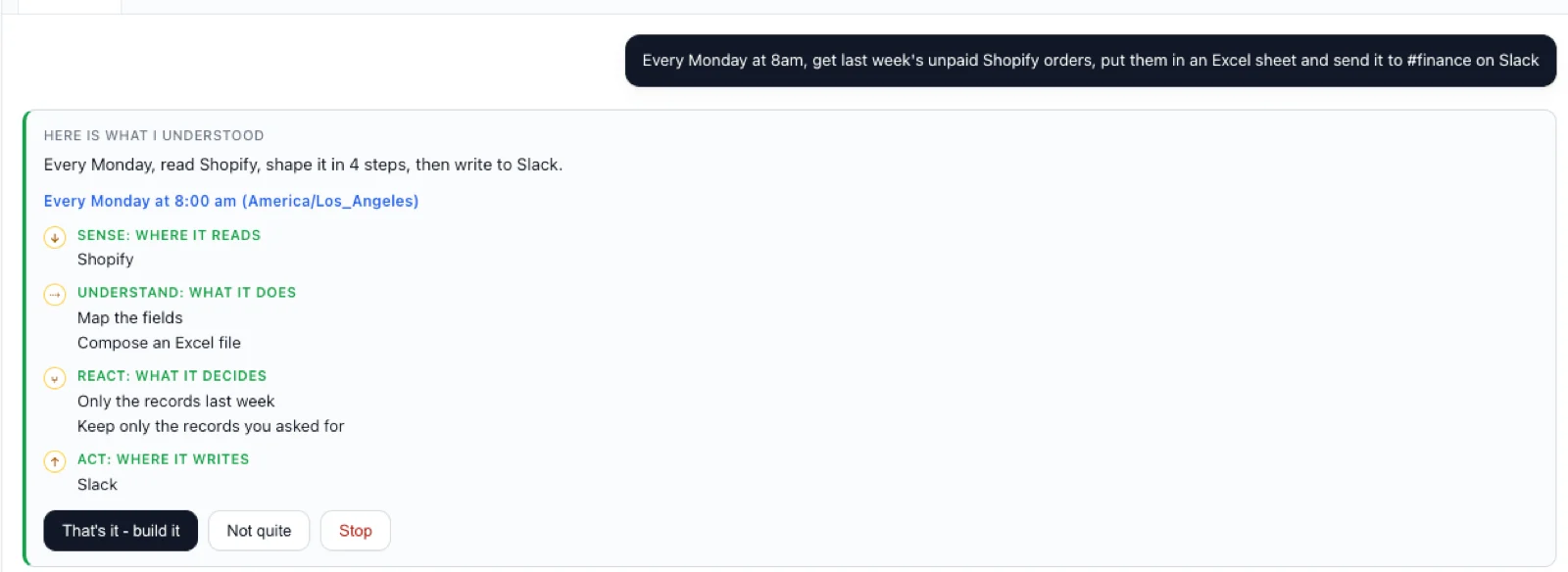
AnnE's plan: every Monday at 8:00 am, read Shopify, put last week's orders in an Excel file and send it to Slack - with buttons to build it, change it or stop.

Why it holds up

Built for jobs that have to be right

The same result, every time

An approved job does exactly what you approved, run after run.

Nothing real until you say so

Sample data first. Sends, payments and deletes wait for a person.

Passwords stay locked away

Each job keeps its own app sign-ins. Neither AnnE nor the AI ever sees them.

Runs where your data is

In our cloud, or inside your own network for systems behind the firewall.

Single sign-on from Pro Team. Development, Test and Production, directory sync, audit export, your own encryption keys and data residency on Enterprise.

Pricing

Every standard app free, on every plan

Shopify, QuickBooks, Slack, Gmail, HubSpot and your own data cost nothing to run. Credits are only for Premium apps - ERP, enterprise CRM and HR, warehouses and databases.

Compare plans

Hand over your first job this week

Start free, or tell us the job and we will build it with you on your sample data.