Admin guide · Security
Single sign-on
Everyone signs in through your identity provider with OpenID Connect. Group membership maps to a console role, and the console never stores a password for them.
| Where | Settings › Security › Single sign-on |
|---|---|
| Who | An admin, or anyone whose role may configure single sign-on |
| Plans | Team and above |
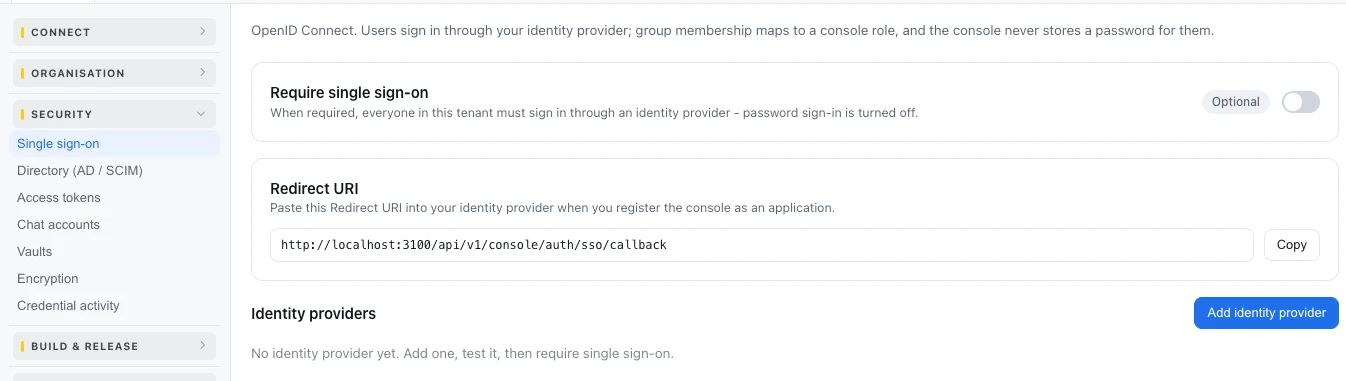
Set it up
- Copy the Redirect URI and paste it into your identity provider when you register the console as an application.
- Press Add identity provider and fill in Name, Issuer, Client ID and Client secret from that application.
- Email domains (comma separated): the domains this provider signs in.
- Default role (when no group matches), or none, so unmapped people are refused.
- Group to role mappings, and Group to space or job to give a group one space or one job.
- The endpoints come from discovery; fill Authorization endpoint, Token endpoint or JWKS URI only if your provider has none. Set Scopes and the Group claim if yours differ.
- Tick Enabled - offered at sign-in, save, and press Test.
Require it for everyone
Once a test sign-in works, turn on Require single sign-on: everyone in the organisation then signs in through an identity provider, and password sign-in is turned off.
People and groups from your directory. Settings › Security › Directory (AD / SCIM) keeps members and groups in step with your directory, on Enterprise.
Last updated October 29, 2026