Admin guide · AI
AI transcripts
Every call a model made on your organisation's behalf: what went to it, what came back, and what the guardrails found. A finding is a prompt for a person; the verdict is yours.
| Where | Settings › Insights › AI transcripts |
|---|---|
| Who | An admin, or anyone whose role may configure AI |
| Plans | Every plan; how long they are kept follows your plan |
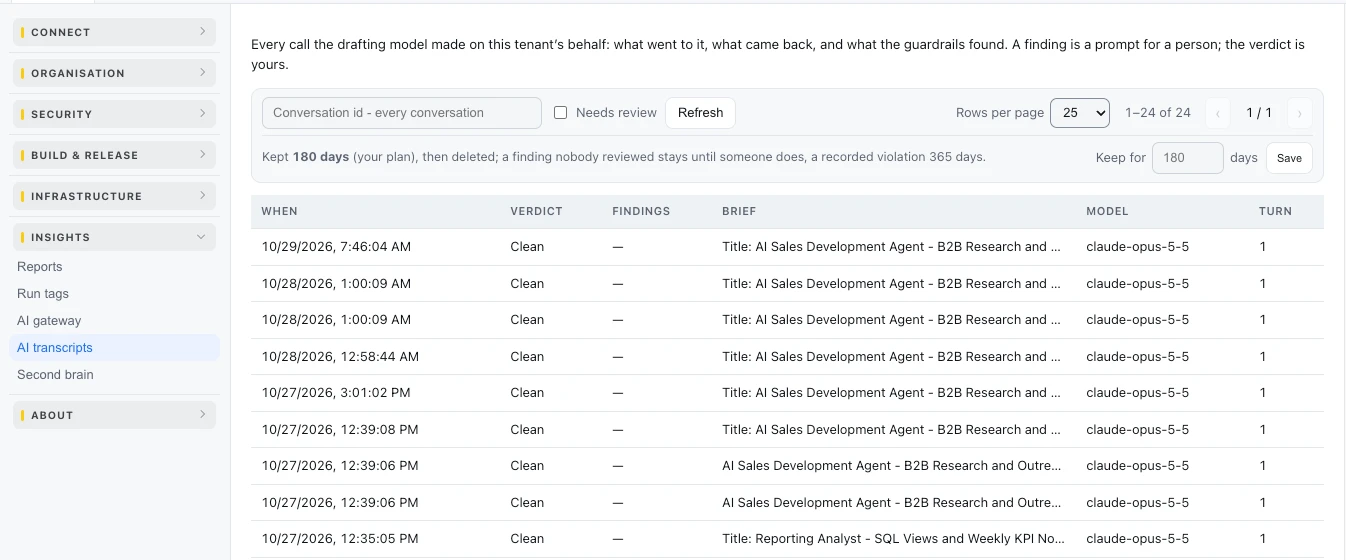
Read the table
| Column | What it says |
|---|---|
| When | The time of the call |
| Verdict | Clean, or Needs review when a guardrail found something |
| Findings | What was found, such as an email address in the text |
| Brief | The request the call served |
| Model | The model that answered |
| Turn | Which turn of the conversation |
Review an exchange
- Tick Needs review to see only the exchanges with findings, or filter by a conversation's id.
- Open one: Data check, Sent to the model and Received from the model, word for word.
- A verdict - Mark compliant or Mark violation, with what was found or why it is fine - is recorded by an operator with the security scope.
How long they are kept
The page says how long transcripts are kept on your plan. Set a shorter time under Keep for (days) and press Save. A finding nobody reviewed stays until someone does.
Last updated October 29, 2026